
Standing in a queue at lunchtime while your stomach growls isn’t anyone’s idea of a good time. That’s exactly the problem the KFC app was built to solve. Whether you’re after a quick bucket on your way home, trying to redeem free food through Colonel’s Club, or just wondering why the app keeps freezing on your phone, this guide covers it all.
Below you’ll find a complete look at what the KFC app does, how to download it, where to find the best app-only deals, how the loyalty scheme actually works, and how it stacks up against ordering through the website or a delivery platform like Uber Eats or Deliveroo. There’s also a troubleshooting section for anyone dealing with login errors, crashes, or an app that simply won’t load.
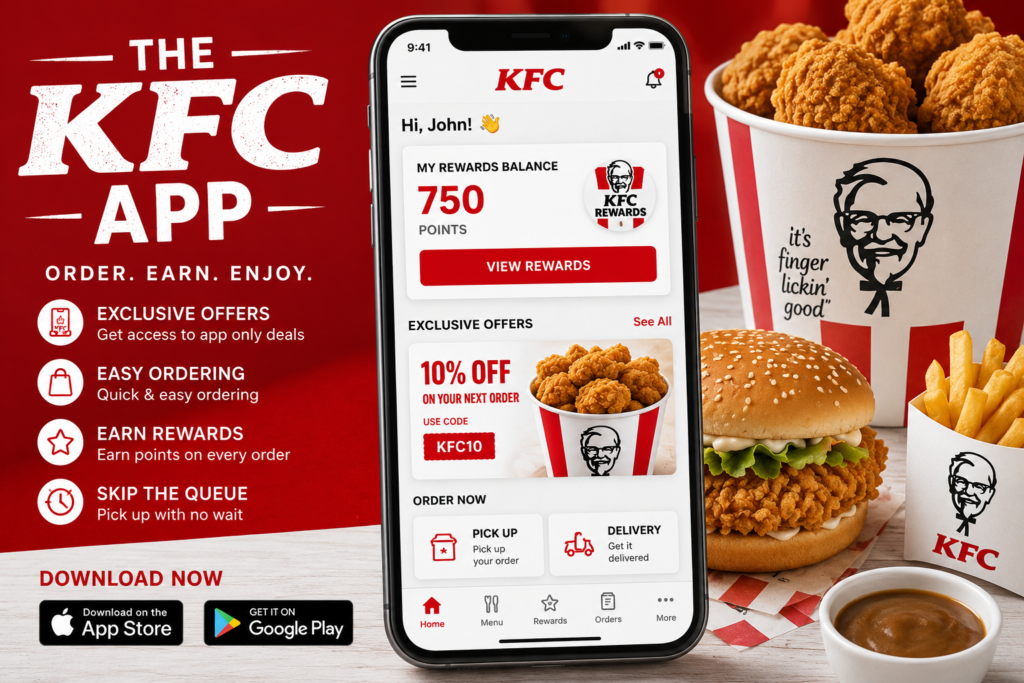
What is the KFC App?
The KFC app is the official mobile ordering app for KFC restaurants across the UK, available for both iOS and Android devices. It’s built around a simple idea: let customers order ahead, skip the queue, and get rewarded for coming back.
At its core, the app lets you:
- Browse the full KFC menu, including limited-time and seasonal items
- Order for click and collect or delivery
- Pay directly through the app using a card, Apple Pay, or Google Pay
- Track and redeem Colonel’s Club loyalty points
- Access app-exclusive deals and vouchers not available in-store
- Find your nearest KFC branch with opening hours and directions
If you’re the kind of person who wants to know exactly what something costs before you commit to it, it’s worth pairing the app with a dedicated menu resource. Sites like the KFC Menu UK Prices guide list current prices and calorie counts for every item, which is handy for planning your order before you even open the app.
The app isn’t just a digital menu, though. It’s designed to make the whole process from deciding what to eat to picking it up faster than doing it in person or over the phone.
Who is the KFC App For?
Realistically, almost anyone who orders KFC more than once in a while will get some benefit from it. Regulars use it for the loyalty points. Busy professionals use it for click and collect during a lunch break. Families use it to order ahead before picking the kids up from school. If you’ve never used it, the biggest immediate benefit is simply avoiding the queue.
How to Download the KFC App iOS & Android
Getting started takes a few minutes. Here’s the straightforward version:
On iOS (iPhone)
- Open the App Store on your iPhone.
- Search for “KFC UK & Ireland” make sure you select the official app published by KFC, since there can be similarly named apps from other regions.
- Tap Get to download and install.
- Once installed, open the app and allow location access so it can find your nearest branch.
On Android
- Open the Google Play Store.
- Search for “KFC UK & Ireland.”
- Tap Install.
- Open the app once it finishes downloading and grant location permissions.
Setting Up Your Account
After installation, you’ll need to create an account or log in. This is also where KFC app sign up happens for new users:
- Enter your email address and create a password, or sign up using a linked Apple/Google/Facebook account where available.
- Verify your email if prompted.
- Add a delivery address or allow location tracking so the app can automatically detect your nearest restaurant.
- Optionally add a payment method (card, Apple Pay, or Google Pay) so future orders are quicker.
Once you’re set up, the KFC app login process is just entering your email and password or using biometric login Face ID or fingerprint if you’ve enabled it in your phone’s settings.
Featured snippet answer: To download the KFC app, search “KFC UK & Ireland” in the App Store or Google Play Store, install it, then create an account with your email to start ordering.
KFC App Exclusive Deals & Offers
This is usually the main reason people bother downloading the app in the first place. KFC regularly runs app-only offers that aren’t available if you order at the counter or drive-through, including the following:
- App-exclusive meal deals on box meals, wraps, and burgers at reduced prices
- Discount codes and vouchers that can be applied at checkout
- Time-limited promotions tied to new menu launches or seasonal campaigns
- Free item offers for signing up or hitting certain order milestones
- Bundle discounts on family feasts and sharing buckets
Offers rotate fairly often, so what’s available one month may be gone the next. The best habit is to check the Deals or “Offers” tab in the app each time before you order, since new vouchers often appear without much notice. Don’t forget to look out for the KFC Tuesday deal, which remains one of the best value offers available through the app.
Tips for Getting the Most Out of KFC App Deals
- Turn on push notifications so you don’t miss flash offers or limited-time vouchers.
- Check the app before checking out even if you already know what you want, since a relevant discount code might apply automatically or be sitting in your offers wallet.
- Combine app deals with Colonel’s Club points where the terms allow it, though be aware some vouchers exclude stacking with loyalty rewards.
- If you’re deciding between menu items and want to compare value before opening the app, a price breakdown like the one on KFC Menu UK Prices can help you spot which meals give you the most food for your money.
Colonel’s Club Loyalty Program: How It Works
Colonel’s Club is KFC’s official loyalty scheme in the UK, built directly into the app. Instead of a paper stamp card, everything is tracked digitally against your account.
How You Earn Points
- You earn loyalty points on eligible purchases made through the app, whether for collection or delivery.
- Points typically accumulate per pound spent, though the exact rate can shift with promotions.
- Some campaigns offer bonus points for trying specific menu items or ordering during certain windows.
How You Redeem Points
Once you’ve built up enough points, they can be redeemed for:
- Free menu items, ranging from small sides to full meals depending on your points balance
- Exclusive rewards not available to non-members
- Birthday treats or anniversary perks in some cases
Getting Started with Colonel’s Club
Joining is usually automatic once you create an account and opt in within the app there’s no separate sign-up process. After that, your points balance updates after each qualifying order, and you can check it any time from your profile.
Colonel’s Club is KFC’s free loyalty program built into the app. Members earn points on purchases and redeem them for free food and exclusive rewards, with no paper card required.
KFC App vs Website vs Uber Eats/Deliveroo
There isn’t a single “best” way to order KFC it depends on what matters most to you: price, speed, or convenience. Here’s a practical comparison.
KFC App vs KFC Website
Both let you order directly from KFC with no added delivery markup, and both offer click and collect. The app tends to have the edge because it supports push notifications for deals, stores your loyalty points automatically, and remembers your order history for faster reordering.
The website is a solid backup if you don’t want to install anything or you’re ordering from a desktop computer.
KFC App vs Uber Eats / Deliveroo
- Price: Ordering through the KFC app or website for collection is generally cheaper, since third-party platforms add service and delivery fees on top of menu prices.
- Delivery: If you specifically want food brought to your door and don’t mind paying a delivery fee, Uber Eats or Deliveroo may be more convenient, especially in areas where KFC delivery UK options are limited.
- Rewards: Colonel’s Club points are only earned through the official KFC app, not through third-party platforms.
- Deals: App-exclusive offers and vouchers are only valid through the KFC app itself.
Quick Comparison Table
| Feature | KFC App | KFC Website | Uber Eats/Deliveroo |
|---|---|---|---|
| Click & Collect | Yes | Yes | No |
| Delivery | Sometimes (branch-dependent) | Sometimes | Yes |
| Loyalty Points | Yes | Limited | No |
| Exclusive Deals | Yes | Some | No |
| Delivery Fees | None for collection | None for collection | Yes |
If you’re mainly picking up your own order, the app usually wins on cost and rewards. If you want food delivered without leaving the house, a delivery platform may still be the more practical choice.
How to Fix Common KFC App Issues (Login, Crashing, Not Loading)
Like any app, the KFC app not working is a common enough complaint, and most issues fall into a handful of categories with straightforward fixes.
App Crashing or Freezing
- Close the app completely and reopen it rather than just switching away and back.
- Check for a pending app update in the App Store or Google Play Store older versions are more prone to bugs.
- Restart your phone, which clears temporary memory issues that often cause crashes.
- Make sure your phone’s operating system is reasonably up to date, since very old iOS or Android versions can cause compatibility problems.
Login Problems
- Double-check your email and password for typos, especially autofill errors.
- Use the “Forgot Password” option to reset your credentials if you’re locked out.
- If you signed up through Apple, Google, or Facebook, make sure you’re selecting the same login method you originally used.
- Clear the app’s cache (Android) or offload and reinstall the app (iOS) if login screens keep failing to load.
App Not Loading or Stuck on a Screen
- Check your internet connection switch between Wi-Fi and mobile data to see if the issue is connection-specific.
- Confirm KFC’s servers aren’t experiencing wider outages, which sometimes happens during major promotions when traffic spikes.
- Uninstall and reinstall the app as a last resort, which resolves most persistent glitches.
Orders Not Going Through
- Verify your payment method is valid and not expired.
- Make sure the selected branch is currently open and accepting app orders some locations pause mobile ordering during exceptionally busy periods.
- Try switching between click and collect and delivery to see if the issue is specific to one order type.
If none of these fixes work, contacting KFC customer support directly through the app’s help section is the most reliable next step, since account-specific issues sometimes need to be resolved on their end.
How to Use the KFC App: A Quick Walkthrough
For anyone opening the app for the first time, here’s the typical flow from start to finish:
- Open the app and confirm your location or select your nearest branch manually.
- Browse the menu or head straight to the Deals tab to check for current offers.
- Add items to your basket, customizing sides, drinks, and extras as needed.
- Apply any voucher codes or available offers at checkout.
- Choose click and collect or delivery, depending on what your branch supports.
- Pay using a saved card, Apple Pay, or Google Pay.
- Track your order status in real time and collect it when notified, or wait for delivery.
- Check your Colonel’s Club points balance afterward to see what you’ve earned.
FAQs
Conclusion
The KFC app is genuinely useful for anyone who orders more than the occasional impulse meal the combination of click and collect, exclusive deals, and Colonel’s Club points adds up quickly if you use it regularly. If you’re new to it, start by downloading it, creating an account, and checking the Deals tab before your first order. And if you want to plan your order in advance, pairing the app with a full, up-to-date breakdown of KFC menu prices in the UK makes it easy to know exactly what you’re getting before you check out.
Download the app today, join Colonel’s Club, and skip the queue on your next order.